PAC CLI generated commands: safe evaluation checklist
Microsoft's Power Platform CLI preview adds API-generated command groups. Learn what changes and how to evaluate them safely.
Harllens George | 2026-09-27
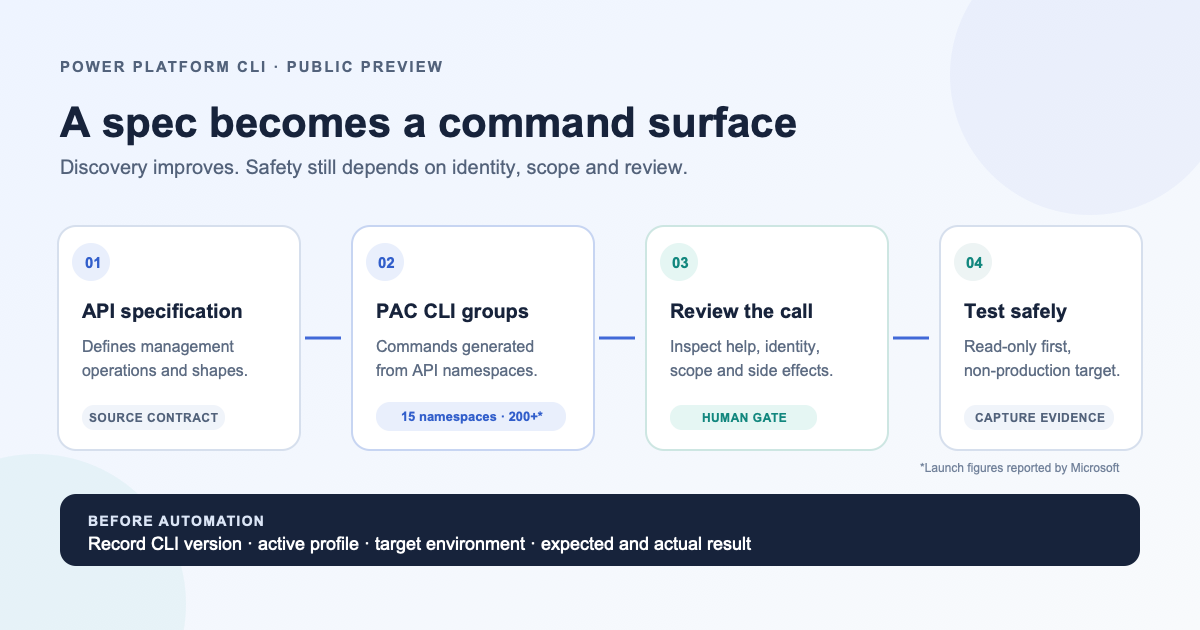
Microsoft's API-generated Power Platform CLI command groups could make new management operations easier to discover. The useful question for platform teams is not how many commands appeared in the preview, but how to evaluate one safely and repeatably.
On September 17, Microsoft announced API-generated command groups for Power Platform CLI (PAC CLI) in public preview. At launch, Microsoft described 15 namespaces and more than 200 commands covering areas such as environments, licensing, governance, Power Pages, Copilot Studio, and role-based access control. The groups are generated from the Power Platform API specification and use the active PAC authentication profile. Read Microsoft's announcement.
That is a meaningful change in command discovery. It is not evidence that every management operation is available, that the interface is stable, or that a command is safe to run against production. The announcement describes a preview that will grow; teams still need their own access, change-control, and rollback boundaries.
What generated command groups change
Power Platform teams often combine a command line, SDK, API, connector, and administration portal. Each can expose useful capabilities, but their naming, inputs, and release timing may differ. Microsoft's approach starts with a public management API specification and generates command groups from its namespaces and operations. The intended result is a more consistent way to discover and invoke those operations from PAC CLI.
The existing tools do not disappear. Microsoft says the same management model also supports its .NET and Python SDKs and the Power Platform for Admins V2 connector. Teams should treat those as distinct interfaces to evaluate, not assume they have identical coverage, behavior, or lifecycle. Choose the surface that fits the operation and its automation context.
Authentication is also operationally important. The generated commands use the active PAC authentication profile. That reduces setup differences between command groups, but it does not remove the need to confirm which identity, tenant, and cloud that profile represents before a command runs.
A practical evaluation sequence
Use a non-production environment and begin with a read-only scenario. Keep the command reference open and treat the preview's help output as the current interface contract.
- Record the tool context. Note the PAC CLI version, selected authentication profile, target tenant and cloud, environment, and operator. Do not paste access tokens or credential output into logs or tickets.
- Discover before invoking. Start with
pac help, then inspect the relevant generated command group's help. Confirm the command, inputs, scope, and whether it reads or changes state. Do not infer behavior from a namespace or command name alone. - Choose the least-impact test. Prefer a list, get, or query operation that cannot modify configuration. Use synthetic or non-sensitive data where practical. If the only useful scenario changes state, prepare a change plan, owner, backup or rollback path, and a separate approval before running it.
- Capture reproducible evidence. Save the CLI version, sanitized command, expected result, actual result, exit code, timestamp, and target environment. Redact user, tenant, and resource identifiers when sharing outside the operations team.
- Compare the interface deliberately. If a workflow also exists in PowerShell, REST, or an SDK, compare only the specific operation you need. Test input validation, pagination, errors, and output shape rather than assuming one generated command proves parity across tools.
- Gate automation. Pin the CLI version in a pipeline or controlled runner, review permissions, separate read and write stages, and add a human approval for high-impact changes. Re-test after a CLI or preview update.
These are recommended controls, not the result of a hands-on tenant test. In particular, a successful read-only command demonstrates only that scenario, identity, environment, and CLI version. It is not a broad security or reliability assessment.
Preview adoption checklist
Before a team standardizes on a generated command group, answer these questions:
- Is the command still in preview, and what changes may arrive without the compatibility expectations of a generally available interface?
- Does the current command reference show the operation and its supported inputs?
- Is the active PAC profile the intended identity, tenant, and cloud?
- What role or permission does the operation require, and can it be tested with a narrower role?
- What is the expected effect, including indirect or asynchronous effects?
- How will the operation be logged, retried, and rolled back if it partially succeeds?
- Which tool version will a script or build agent use, and how will updates be tested?
If the answers are unclear, keep the command in discovery and testing rather than promoting it into unattended automation.
Common mistakes to avoid
- Treating command count as coverage. The launch figures describe a preview snapshot, not every API operation or a completeness guarantee.
- Running against the wrong target. Confirm the active profile, tenant, cloud, and environment before invoking a command.
- Automating before learning the contract. Inspect current help, start with a read-only operation, and add an approval boundary before writes.
- Calling suggested checks completed tests. Record actual CLI version, target, expected result, and observed result separately.
The useful signal
The larger architectural signal is the shift toward a defined management API as a source for multiple operator tools. Generated command groups can improve discoverability and reduce the amount of bespoke command plumbing, especially as a platform adds capabilities. The tradeoff is familiar: generated consistency does not automatically mean complete coverage, safe defaults, or stable contracts.
For now, the sensible adoption path is small: inspect the current PAC help, test one low-impact operation outside production, capture what happened, and decide whether the interface is mature enough for the specific workflow. That gives the preview room to prove its value without making a preview command a production dependency by accident.
Further reading
- Dataverse and SharePoint permissions: check file access for a separate example of validating Power Platform boundaries.
- Microsoft's PAC CLI announcement and official command reference.
Editorial note: this article summarizes Microsoft's public-preview announcement and proposes an evaluation method. No tenant was accessed or tested for this article. The cover is an original conceptual diagram, not a product screenshot.