Dataverse and SharePoint permissions: check file access
Dataverse and SharePoint protect different resources. Use a two-user checklist to test file access, shared links and discovery before rollout.
Harllens George | 2026-09-27
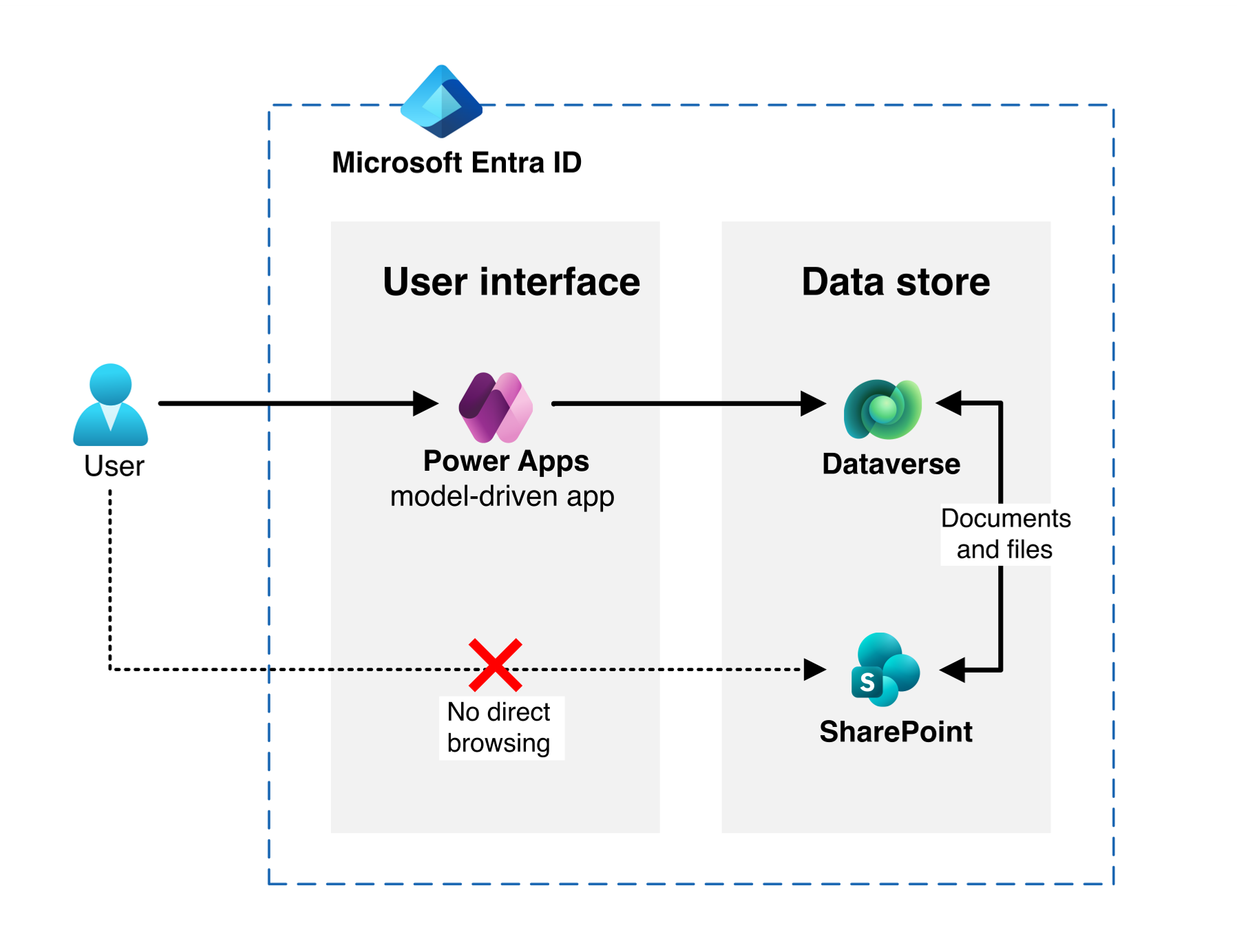
Your model-driven app hides a case from a colleague. Can that colleague still open its attachment using a SharePoint link?
Dataverse and SharePoint permissions protect different resources. Dataverse record access does not automatically transfer to documents stored in SharePoint. Test the file as well as the app. Microsoft's reference architecture.
Sources checked September 27, 2026. AI-assisted guide. The checklist below is a recommended review method, not a report of completed tenant testing.
Separate Dataverse and SharePoint permissions
Start a review with three questions and assign someone to answer each:
- Can the person open the business record? Ask the app owner to demonstrate the intended Dataverse access.
- Can the person use the document-management controls? Review the relevant SharePoint site and Document Location privileges in Dataverse. Microsoft documents these separately for creating locations, fixing links and managing documents. Document-management permissions.
- Can the person open the file itself? Ask the SharePoint owner to check the file's effective access and sharing arrangements. Do not infer the answer from a missing button in the app.
Record the expected result before testing. "Cannot see the case" and "must not read its documents" are two acceptance requirements, not one.
Choose the control for the actual requirement
Reduce accidental discovery. Microsoft's reference pattern aligns workload groups and restricts navigation and search while retaining native document management. It can suit an accepted discoverability boundary. It does not reproduce Dataverse's per-record permissions on every file.
Enforce document isolation. If a user must not read another team's file even with its URL, evaluate file/folder authorization or separate storage boundaries. Microsoft's reference explicitly excludes strict file-level isolation requirements from its discovery-based pattern. Pattern and limitations.
For that second requirement, ask the design owner to explain how grants, revocation, ownership changes and failures will work. Reject a proposal that describes only how users find documents.
Copilot discovery is a separate review
Microsoft's Restricted Content Discovery limits organization-wide discovery and Copilot experiences; it does not change existing permissions. Microsoft describes it as a temporary governance measure while owners review access. Site-context search and other exceptions mean it is not a universal hiding switch. Check the current prerequisites and propagation guidance before using it. Restricted Content Discovery.
Log discovery results separately from authorization results. A missing search result does not prove denied file access.
Run a two-user, direct-link check
Use a non-production environment and synthetic documents. Choose two ordinary test accounts, A and B, rather than administrators. For the sample case, A should read the record and file; B should read neither. Have both owners approve that requirement first.
- Capture the baseline. Record the test accounts' groups, app roles, document location, SharePoint permissions and existing sharing links. Preserve the settings needed to restore the test setup.
- Test the intended route as A. Open the case, follow its document link and read the sample file. A denied result here is also a defect: security acceptance includes legitimate access.
- Test the app as B. Try the case through navigation and its known record URL. Record the result without treating it as the document result.
- Test the file as B. In B's separate browser session, open the known SharePoint file URL. Also test an existing sharing link if the workload uses one. If B reads the file, the isolation requirement failed even when the app test passed.
- Check discovery separately. Test the search or Copilot entry points in scope. Note the exact experience, query, policy and time; do not substitute these results for step 4.
- Test a lifecycle change. Revoke a test grant using the proposed operating procedure, then repeat the allowed/denied checks. Record session and propagation conditions instead of assuming an immediate result.
For each check, keep: identity, route, expected result, actual result, timestamp, evidence and owner. Mark anything not exercised as untested. Do not attach real customer files to the evidence record.
Pitfalls before rollout
- Administrator-only testing: repeat with the intended user's effective permissions.
- Search disabled equals secure: require a direct-link test whenever file isolation is a requirement.
- One successful check equals complete coverage: include the workload's sharing, reassignment and revocation paths.
- Unowned permission automation: name the operator, failure alert and recovery procedure before adoption.
Review Dataverse and SharePoint permissions together, but accept each boundary separately. Keep the rollout blocked if required file denial is missing or untested; have the app and document owners agree on remediation and a retest.
Further reading
- PAC CLI generated commands: safe evaluation checklist covers a separate Power Platform change-control scenario.