GitHub Copilot Dynamic Workflows: A Practical Guide
GitHub Copilot dynamic workflows are in public preview. Learn how code-defined steps, agent judgment, and human review fit together.
Harllens George | 2026-10-06

A multi-step AI task needs more than a strong prompt. It also needs a clear sequence, explicit handoffs, and a decision about where a person must review the result.
GitHub announced dynamic workflows for Copilot CLI, the Copilot app, and the Copilot SDK on October 1, 2026. GitHub describes them as programs that define a process around one or more agents: code controls the stages and how results move between them, while agents handle work that needs analysis or judgment. The feature is in public preview, so teams should recheck its current capabilities and setup before designing production dependencies. Read GitHub's announcement.
The useful shift is from asking an agent to “handle this” toward specifying a process that can be inspected and repeated. That does not make the agent's conclusions correct by default. It does make the workflow's boundaries easier to discuss: which steps always run, which steps need judgment, what evidence is passed forward, and where work pauses.
What a dynamic workflow changes
GitHub says workflow steps can run sequentially, in parallel, or in a combination. The announcement also lists command and tool use, structured results, subagent verification, user input when the client supports it, and review checkpoints. These are vendor-described capabilities, not results from a test performed for this article.
This is different from a one-off prompt, where the process is mostly implicit in the conversation. It is also different from simply asking an agent to delegate a task. In GitHub's description, a dynamic workflow carries out a process defined in code; the agent contributes analysis within that process.
That separation is useful when the same kind of task recurs. A team can make the order of operations, required inputs, result shape, and stop conditions visible instead of relying on each operator to remember them.
Decide what belongs in code and what belongs to an agent
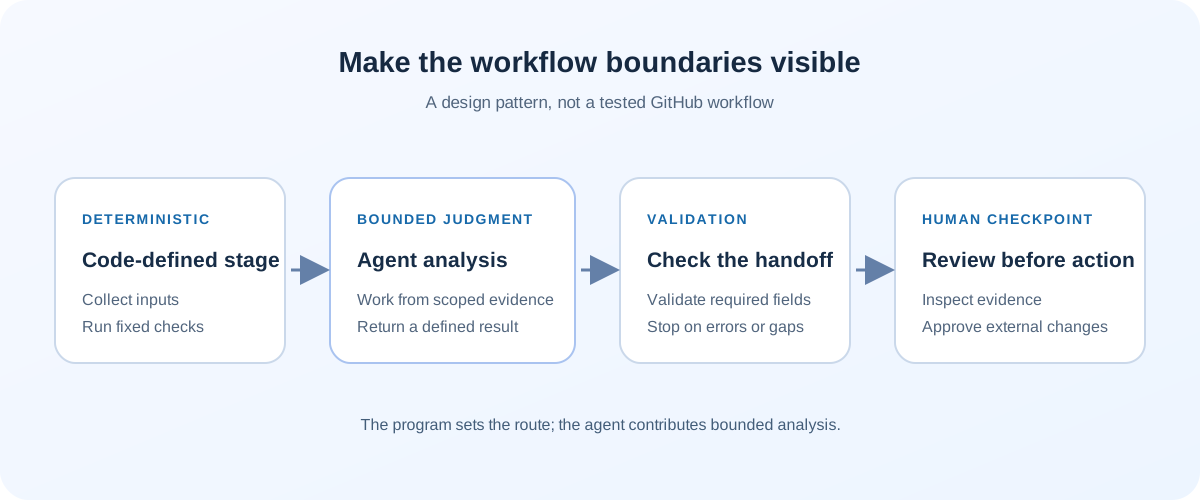
Use ordinary program logic for steps that should be predictable: collecting inputs, invoking known checks, validating required fields, passing a result to the next stage, and enforcing a checkpoint. Use an agent where the work is genuinely interpretive, such as grouping ambiguous findings or summarizing evidence for a reviewer.
For example, a team could design a pull-request review workflow like this:
- Collect the changed-file list and run the repository's existing checks.
- Divide independent areas of the diff for separate review tasks.
- Ask agents to return findings in a defined structure, including file, evidence, impact, and confidence.
- Validate that each result has the required fields and points to changed code.
- Pause for a maintainer to inspect the evidence before any comment or merge action.
This is an illustrative design, not a ready-to-run Copilot workflow or a test result. The important pattern is that the program defines the route and the agent supplies bounded analysis. A human remains responsible for the decision that changes the repository.
A practical pilot checklist
Before putting a dynamic workflow into regular use, write down:
- The trigger and scope. What starts the workflow, and which repositories, files, or services may it inspect?
- The stable steps. Which checks always run, in what order, and which can run independently?
- The result contract. What fields must an agent return, and how does code handle missing, malformed, or contradictory results?
- The stop conditions. Which errors stop the run instead of being silently retried or skipped?
- The human checkpoint. Which actions must wait for review, especially comments, merges, deployments, customer communication, or data changes?
- The operating cost. Which model calls and tools may run, how will the team see usage, and what limits stop an unexpectedly large run?
- The audit trail. What sanitized inputs, outputs, tool calls, and decisions are retained so another operator can understand what happened?
Start with a reversible task and known expected results. Compare the workflow output with a human-reviewed baseline, include cases where a tool fails or returns incomplete information, and test how a pause and resume behave. Do not treat a green workflow run as proof that every finding is correct.
Common mistakes to avoid
Putting the whole process in a prompt. If order, required fields, or safety gates matter, make them explicit in the workflow design and validate the outputs.
Treating parallel reviews as independent proof. Several agents can share the same blind spots or source material. Keep the underlying evidence visible and use a reviewer who can challenge the result.
Retrying an external action blindly. A timeout does not always mean a write failed. Design idempotency or require a human check before repeating a side effect.
Assuming a checkpoint is a complete approval system. A pause can create a review opportunity, but the team still needs to define who may approve, what they inspect, and which action follows.
Depending on preview behavior as a stable contract. GitHub labels dynamic workflows as public preview. Recheck documentation and test important workflows after product changes.
The takeaway
Dynamic workflows offer a way to make agent-assisted work more structured: code can define stages and handoffs, while agents contribute judgment where it is useful. The practical benefit is not guaranteed correctness; it is a clearer place to put validation, evidence, limits, and human decisions.
Choose one repeated task, draw its steps, and mark every point where the system could change something outside the workflow. Pilot only after those boundaries and the expected outputs are clear.
Further reading
- GitHub's dynamic workflows announcement
- A local AI coding sandbox needs a clear session boundary
- Copilot Home, Code and Autopilot: a team checklist
Editorial note: This article summarizes a GitHub public-preview announcement and proposes a workflow-design checklist. No dynamic workflow was configured or tested for this article.