A local AI coding sandbox needs a clear session boundary
GitHub Copilot's local sandbox controls can constrain files, network, and credentials. Here is what they cover, what they do not, and how to evaluate them.
Harllens George | 2026-09-27
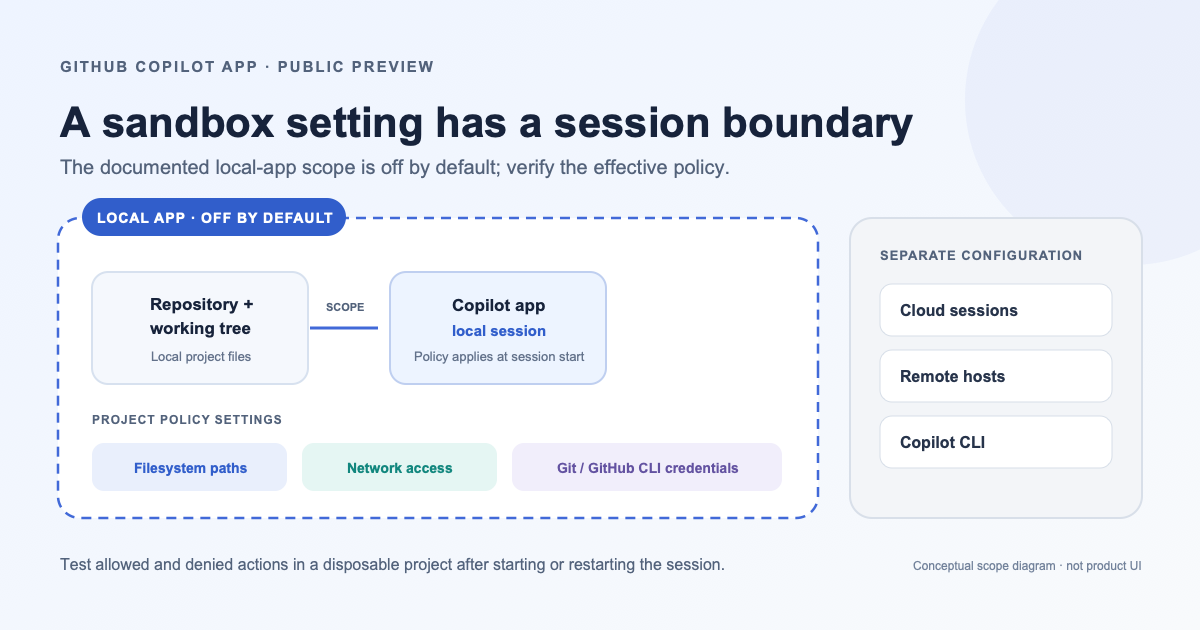
A sandbox can narrow the impact of an unintended command, but only if the team knows which session it applies to, what policy actually took effect, and which resources remain in scope.
GitHub announced local sandboxing for the Copilot app as a public preview on September 23. The feature lets a project define filesystem, network, and credential settings for local repository and working-tree sessions. It is off by default, and it does not apply to Copilot cloud sandbox sessions, remote-host sessions, or the separately configured Copilot CLI. GitHub's announcement and setup link describe the current boundary.
Those qualifiers matter more than the word sandbox. A project setting is not automatically a policy for every agent session, machine, or tool. The useful security question is: for this session, did the expected restrictions take effect before an agent ran a command?
What the preview controls
The Copilot app's project settings describe filesystem access, outbound internet and local-network access, and use of Git and GitHub CLI credentials for authenticated operations. Filesystem policy can add read/write paths, read-only paths, and denied folders. The effective policy can be more restrictive when enterprise-managed settings apply.
GitHub says the settings are applied when a sandboxed session starts. Changes to the project policy take effect for new sessions or when an existing session restarts. If the operating system cannot enforce the requested policy, the sandboxed shell fails with an error instead of continuing without the sandbox.
That gives the feature a useful fail-closed behavior at the shell boundary. It does not establish that every application, extension, credential store, or remote execution path has the same boundary. Scope the claim to the documented local Copilot app session.
Make the boundary testable
Before enabling a sandbox for regular work, define what it should allow and deny. A simple test plan can make that policy concrete:
- Start with a disposable repository. Use a test project without customer data, production credentials, or valuable uncommitted work.
- Separate read from write. Give the agent write access only to the project paths it needs. Put local secrets, personal files, and unrelated repositories outside the allowed write scope or in denied paths.
- Specify network needs. Decide whether the task needs internet or local-network access. Do not leave access open simply because a tool might need it later; add a documented exception when a known workflow requires it.
- Review credential scope. Decide whether the task needs Git authentication or GitHub CLI authentication. If it does, use an identity and repository scope appropriate to the work rather than treating credentials as a generic capability.
- Create harmless test cases. Place a dummy file outside the allowed area and try a harmless read and write. If network access is disabled, test a benign request to a known endpoint. Record the expected result, actual result, client version, OS, and session type.
- Test policy changes at a new session boundary. Change a setting, start a new session or restart the existing one, and verify the effective behavior again. A changed project setting should not be assumed to retroactively alter a running process.
- Check enterprise policy. Ask the administrator which managed settings can narrow or override the project's request, then document the effective result for the team's supported environment.
These are recommended checks, not results from a test performed for this article. Use current GitHub documentation and your organization's approved test environment before relying on a setting.
Avoid three scope mistakes
Mistaking local for universal. The announcement distinguishes local repository and working-tree sessions from cloud sandbox and remote-host sessions. A policy checked in one mode says nothing about the others. Copilot CLI has separate sandbox configuration, so validate it separately if the CLI is in scope.
Treating “enabled” as evidence. A toggle records intent. The useful evidence is a test of the actual session after it starts: what files can it read or change, which network paths work, and which credentials are available? Repeat after policy or application updates.
Replacing the rest of secure development. Sandboxing can reduce the blast radius of unintended commands; it does not replace code review, dependency controls, protected branches, least-privilege credentials, or an incident-response path. Keep those controls around the work, not just inside the local session.
Adopt by workflow, not by slogan
Start with one low-risk development workflow and a written policy. Record permitted paths, network needs, credential access, session type, and the tests that show the policy took effect. Have the security or platform owner review exceptions before using the setup with sensitive repositories.
The practical benefit is not that an AI coding agent becomes trustworthy by default. It is that a team can place explicit, testable limits around some local sessions and fail closed when the operating system cannot apply them. That is a useful control when its boundary is visible and maintained; it is not a substitute for understanding where the agent is actually running.
Further reading
- One MCP endpoint is not a complete security boundary compares a separate remote-tool access boundary.
- GitHub's local sandbox configuration guide and public-preview announcement.
Editorial note: this article summarizes GitHub's public-preview documentation and proposes an evaluation checklist. No local sandbox was configured or tested for this article. The cover is an original conceptual diagram, not a product screenshot.