One MCP endpoint is not a complete security boundary
Cloudflare MCP Portals are generally available, but one endpoint does not enforce every upstream control. Check access, identity, inspection and logs.
Harllens George | 2026-09-27
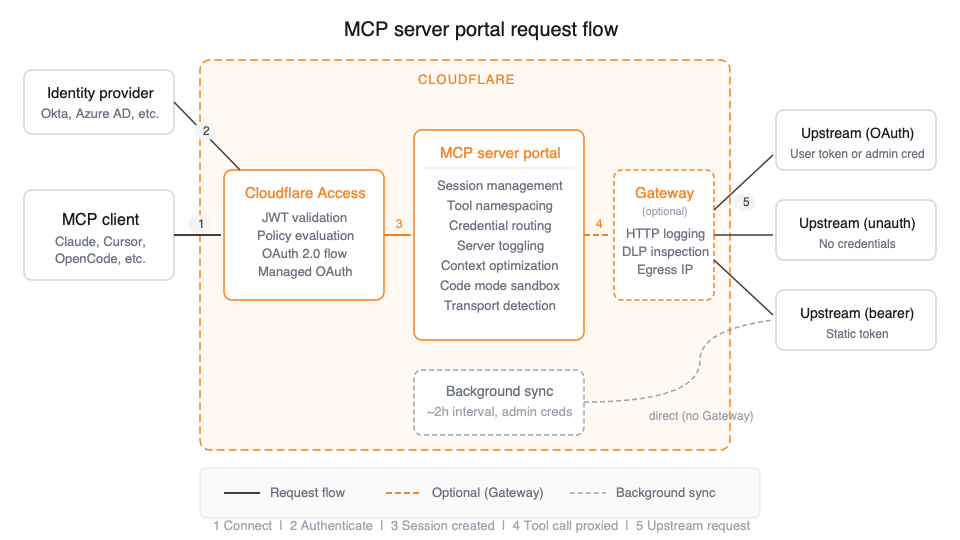

A managed portal can simplify how teams connect clients to approved MCP servers. It does not, by itself, prove that every upstream path is protected, every request is inspected, or every identity policy is enforced.
Cloudflare announced that MCP server portals reached general availability on September 24, 2026. A portal gives users one endpoint for approved Model Context Protocol servers, while Cloudflare Access records tool, prompt, and resource activity. The release also adds options such as Gateway routing, service-token authentication, Code Mode policies, session management, and Logpush integration. Cloudflare's announcement lists the release scope.
The architectural question is not simply whether an organization has a portal. It is which requests go through it, which identity is used upstream, and what a user can reach outside it.
Separate the control planes
Think about at least three boundaries:
- Portal access: who can authenticate to the portal and see its connected servers.
- Upstream server authorization: whether the MCP server itself enforces the identity and policy required for a request.
- Traffic inspection and logging: whether a request passes through Gateway and which records are exported or retained.
These boundaries can be configured together, but they are not interchangeable. A successful portal login does not prove that an upstream server rejects a direct connection. An Access log is not automatically a Gateway HTTP log. A DLP policy only protects traffic that traverses the configured inspection path.
The direct-URL bypass to test first
Cloudflare's documentation is explicit: an Access policy can hide an MCP server from users in the portal, while those users may still connect to the server using its direct URL. To make Access authentication the enforcement point for the upstream connection, Cloudflare instructs administrators to configure Access as the server's OAuth provider. The setup guide documents the caveat.
That means a production design should inventory every upstream endpoint and verify its own authentication. Test both paths with a non-privileged identity: the portal route and the direct upstream URL. If the direct route remains publicly or broadly accessible, portal visibility rules alone do not close it.
Map identities before connecting clients
Clarify whether requests should run with each user's upstream identity or with an administrator credential. Per-user authorization can support user-specific permissions where the provider and configuration allow it. A service-token or machine-to-machine connection is different: Cloudflare's documentation says service-token sessions use the server's admin credential for upstream requests and do not support per-user OAuth for those servers.
That distinction changes the audit and authorization model. If one upstream administrator identity is used for many callers, the upstream system may not see which human initiated each action. Keep user identity, service identity, delegated permissions, and audit evidence explicit in the design. Avoid sharing a powerful admin credential merely to make a connection work.
Understand the policy limitations
Cloudflare documents that independent MFA, purpose justification, and temporary authentication are not enforced when MCP servers are authorized through a portal. Other selectors, such as email, group, country, and device posture, may still be enforced. Teams that rely on those excluded controls for upstream access need a different or additional enforcement design; do not assume the portal will reproduce every Access policy behavior.
Operational behavior matters too. Cloudflare notes that upstream admin OAuth tokens can expire silently, leaving a server in an error or synchronization-required state until it is reauthenticated. Include server-health review and credential renewal in the support runbook.
Know what Gateway sees
When Gateway routing is enabled, real-time user tool calls can appear in Gateway HTTP logs and be evaluated by matching DLP policies. Cloudflare says background synchronization of tools and prompts does not route through Gateway. Therefore, do not describe Gateway routing as inspection of every operation performed by a portal.
The documentation also says Logpush export for MCP portal logs is available only on Enterprise plans. Confirm the account's plan and retention needs before designing a logging requirement around export. Decide separately what Access records, what Gateway records, where each dataset is retained, and who can review it.
A rollout review checklist
Before connecting an MCP client to a production portal, document and test:
- Every portal and upstream server URL, including direct routes that bypass the portal.
- The authentication provider, user or service identity, credential owner, and scope for each upstream server.
- Whether direct upstream access is blocked or independently authenticated.
- Which access-policy features are relied on and whether they are supported for portal-authorized servers.
- Whether Gateway is enabled, which live traffic it inspects, and which DLP rule matches the upstream hostname.
- Which activities appear in Access logs versus Gateway logs, retention duration, and export-plan availability.
- How expired upstream credentials, server sync errors, denied tool calls, and policy changes are detected and recovered.
- A least-privilege test for allowed and denied identities across both portal and direct URLs.
Record expected and actual results for each route. This is a suggested architecture review, not a report of a Cloudflare configuration or security test performed for this article.
Treat the portal as a useful layer, not a verdict
An MCP portal can offer a cleaner connection point and useful visibility for a growing set of remote servers. Its value depends on the upstream controls and operating practices around it. Protect the source endpoints, choose an explicit identity model, understand what the policy engine does not enforce, and verify which traffic is actually logged or inspected.
That is the difference between deploying a convenient endpoint and building a defensible tool-access boundary.
Common mistakes to avoid
- Assuming portal visibility blocks a direct server URL. Test and protect the upstream endpoint independently.
- Treating Access and Gateway logs as one dataset. Define what each product records and which paths it actually sees.
- Assuming every Access policy feature applies. Check the documented exclusions for portal-authorized servers.
- Calling the diagram a test result. It explains documented request paths; no account or deployment was configured for this article.
Further reading
- A local AI coding sandbox needs a clear session boundary covers a distinct, session-scoped AI tool boundary.
- Cloudflare's MCP server portal documentation and general-availability changelog.
- Image attribution: Cloudflare's original request-flow SVG, reused without content changes under CC BY-SA 4.0, as stated by Cloudflare Docs.
Editorial note: this article is based on Cloudflare's public release and configuration documentation. No Cloudflare account was configured or tested for this article. The cover is the official Cloudflare Docs request-flow diagram, converted to PNG without cropping or overlays and reused under CC BY-SA 4.0.