What a VPN changes about your public IP address
Learn what a VPN changes about your public IP address, what remains visible, and how to run a simple before-and-after check without assuming anonymity.
Harllens George | 2026-07-13
When a VPN routes your web traffic through its server, the website normally sees the VPN server's public IP address instead of the address assigned to your home, mobile, or office connection. That is a useful change, but it covers one part of online privacy.
This guide shows what changes, what stays visible, and how to check the result with My IP Address.
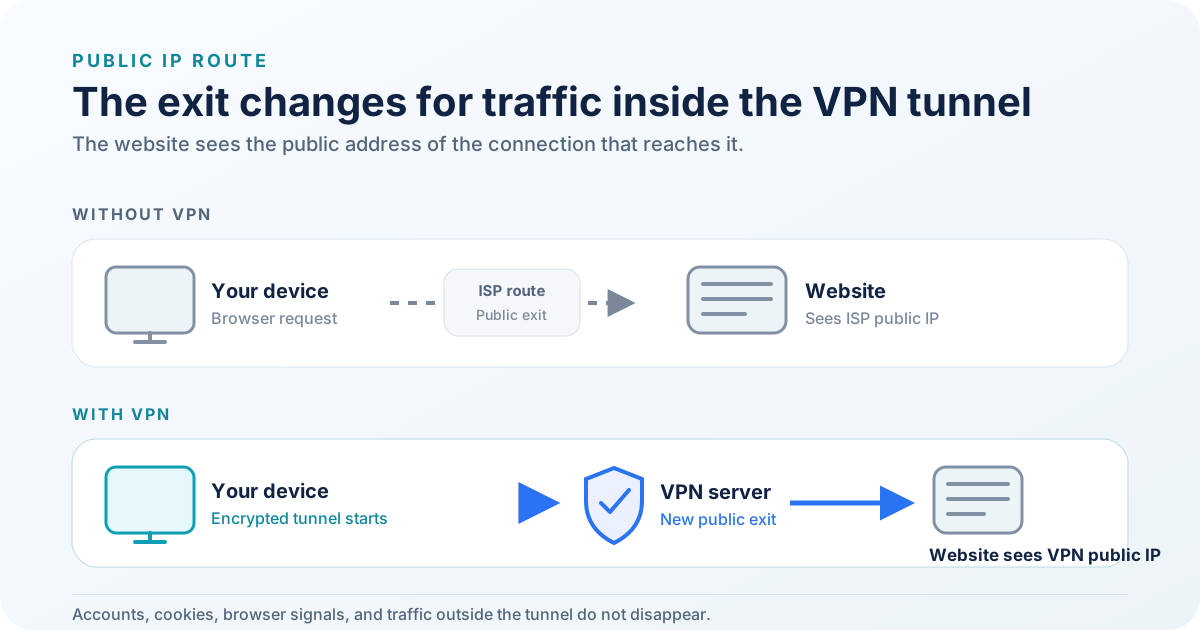
Only the public exit for tunneled traffic changes. Accounts, cookies, browser signals, and excluded traffic remain.
Your public IP without a VPN
Your router or device uses a public internet address to communicate with services outside your local network. A website receives an address for each connection. Depending on the network path, that address may be IPv4 or IPv6.
The public IP can reveal the network operator and an approximate area. Geolocation databases can be wrong or outdated, so a city label is an estimate rather than proof of physical location.
Devices inside your home may use private addresses that never appear to the website. Carrier-grade NAT, corporate gateways, and shared networks can also make many people appear behind one public IPv4 address.
Your public IP with a VPN
A typical VPN app creates an encrypted connection between your device and a VPN server. Traffic covered by that tunnel leaves the VPN server for its destination.
For a website request sent through the tunnel:
- the website usually sees the VPN server's public IP;
- the apparent network operator becomes the VPN provider or its hosting partner;
- the approximate location follows the exit server's registration or geolocation record;
- your internet provider still knows you connected to a remote server and can measure timing and volume.
The VPN provider can occupy a privileged position in this route. Review its logging policy, jurisdiction, technical controls, audits, and ownership before moving trust from your network provider to the VPN service.
IPv4 and IPv6 need separate attention
IPv4 and IPv6 are separate address families. A browser request may use either one based on the device, network, DNS response, browser, and destination.
A VPN may tunnel both protocols, disable one inside the tunnel, or support them differently across platforms. A single result confirms the address used for that request. It does not prove that every application and protocol on the device follows the same path.
If your threat model depends on leak prevention, use the provider's platform-specific documentation and a dedicated leak test. Do not infer full-device protection from one browser request.
Run a simple before-and-after check
- Disconnect the VPN.
- Open My IP Address and note the displayed public IP version, address, country, and network provider.
- Connect to the VPN server you intend to use.
- Reload the page in a new request.
- Compare the address and network details.
A changed result shows that this web request reached the site through a different public route. An unchanged result can indicate that the VPN is not covering the browser, the connection failed, split tunneling excludes it, or the displayed data has not refreshed.
Do not publish screenshots that expose an address you consider sensitive. An IP address is network data and can change, but it can still identify a connection at a point in time.
Original macOS verification
On 15 July 2026, the owner followed this process on macOS with Proton VPN 6.5.1 (3106797.2605011144). The VPN was disconnected for the first My IP Address request and then connected through Germany Secure Core for the second request.
Both requests used IPv4, and the second request showed a different public IPv4 address. No connection issue was observed. The full addresses are intentionally not retained in this repository.
This result demonstrates one browser request on one device and date. It does not prove that every application, DNS request, IPv6 path, split-tunnel rule, or later session used the same route.
What a VPN does not remove
A VPN does not automatically remove:
- cookies and local storage already saved in your browser;
- account sessions that identify you after sign-in;
- browser or device fingerprinting signals;
- information you enter into a website;
- malware, unsafe extensions, or compromised software;
- traffic that bypasses the tunnel because of configuration or platform limits.
HTTPS still matters. It protects the content between your browser and an HTTPS website even after traffic leaves the VPN server. A VPN does not replace secure websites, software updates, strong authentication, or careful account use.
Choose the next guide
Read Privacy and security guides for the differences between public IP checks, VPNs, Tor, and secure operating environments.
If you are considering Proton specifically, read Proton VPN explained. That article separates current provider documentation from the owner's long-term experience and contains a clearly disclosed affiliate link.
Primary sources
- Cloudflare Learning Center: What is my IP address?
- Proton VPN: How does a VPN work?
- IETF RFC 8200: Internet Protocol, Version 6
- IETF RFC 1918: Address Allocation for Private Internets
The Proton link explains VPN behavior from a provider's perspective. The network standards define the protocols; they do not evaluate any commercial VPN service.